OpenALPR - Request and activate license for reading plates

Aldo Cera de la TorreÚltima actualización hace 4 días
Request license
Once the purchase is made it is necessary to send an email to xavier.guereque@syscom.mx with the following information:
Client number
Bill number
Once the email is received, the process for requesting the license will begin. After it is generated, it will be sent to the same email from where it was requested.
Example of license:
SEpKS0xNTk524GsuX24ffj9v3s1ezh7Ofjz/L9/qWgpaShraadcevqpOSm5eXnJOQAfglxEqeG/Jnsg868tTph4GV6mYL/1b+G+JDXUkFUT0jX27iSIVHfDURiDyc5DlHutabBZTAu9/Xepeo+TLXM/669ZMW/ERdnzZ+aRbBHfLyM4YR0iyHlar7Zn0A185NIuActivate License
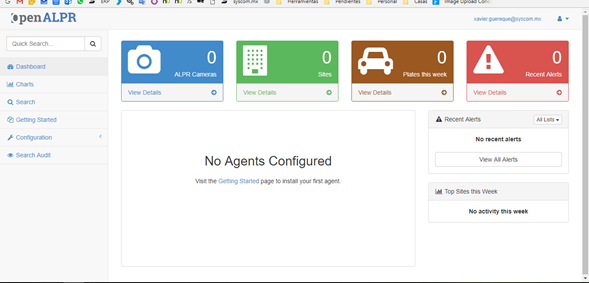
To register it, we enter the web interface of our OpenALPR server by typing the ip address in a web browser.
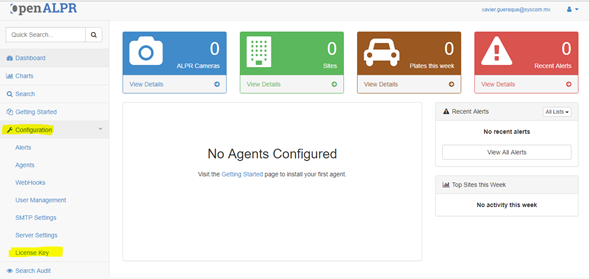
Once logged in, we enter the Configuration / License Key option
Then we paste the license that arrived by mail and click on Update
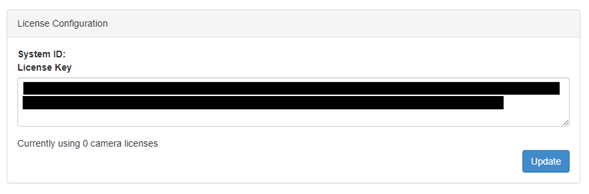
Once this is done, the license activation message will no longer appear, that is, it will already be active.